Create or import a project
Start from a blank screenplay or import an existing PDF draft.

Quick Start
Linearscript is built for writers who want to see the whole story while writing the details. You can plan your screenplay on a visual timeline, divide it into acts, write scene by scene in Focus Mode, keep notes attached to scenes and export a clean screenplay version when you are ready.
Start from a blank screenplay or import an existing PDF draft.
Arrange your story visually across ACT I, ACT II and ACT III.
Add a story structure guide to compare your pacing.
Click a scene to write without the full timeline getting in the way.
Choose whether each block is action, character, dialogue or another screenplay element.
Keep reminders, links and attachments connected to the right scene.
Invite collaborators or approve access requests from the Share menu.
Create a clean export with title page, timeline, beat guide and screenplay pages.
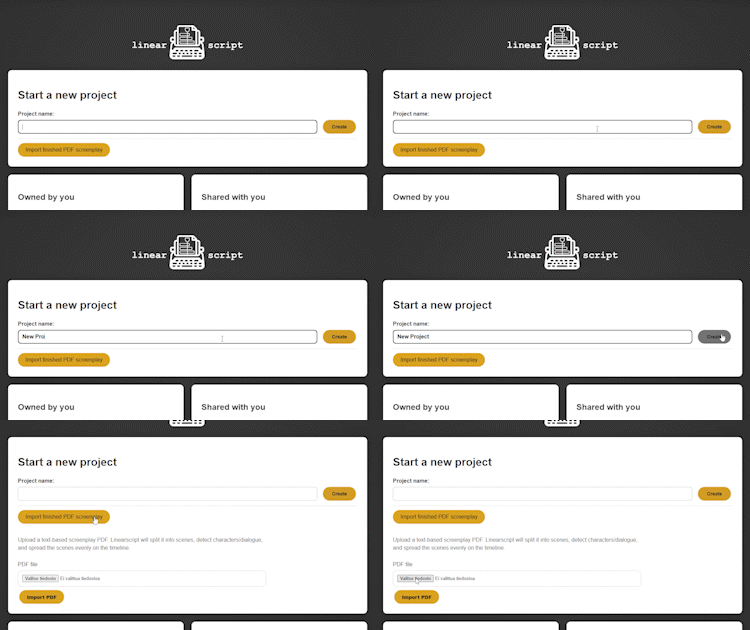
Create a new project from the dashboard by entering a title and pressing Create. If you already have a finished screenplay PDF, you can import it instead. Linearscript will try to detect the title, writer, scene headings, characters and dialogue, then place the scenes evenly on the timeline. PDF import is a starting point, not a final formatting guarantee. Always check the imported scenes before continuing.
Click a step to keep this explanation visible.Create a new project or return to your dashboard and start building your screenplay.